Thursday, 31 August 2017

How I managed to bring down my mobile app service hosting cost from $200+ PA to less than $10 PA using Azure

I developed a mobile app for Android & Windows mobile few years ago. At that point of time, I choose to host my App service (.Net web app) & Database (SQL server) in GoDaddy. My initial expectations are less than 100 active users per day. My hosting charges for Deluxe windows hosting for 2 yrs plan is 430 AUD. I felt which is fine and which can handle the traffic very easily. People started downloading & using the app. Database hosted on a shared hosting server. Which is a very painful thing when you have more than 10 active users trying to access the database through API and it always gets locked. Because of this issue, API didn't respond back to the user correctly and it created more damage to the reputation of the app.


 How did I FIX the issue:

So my App's main problem is Sustainability & Scalability.


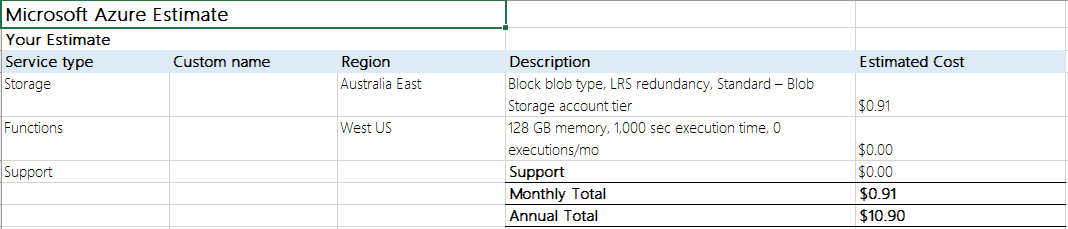
To make the App sustainable & scalable, I take the decision to move my hosting to the cloud. I choose Azure because both app service & DB developed on Microsoft technologies. With the cloud support, I can easily scale my App service based on user activity. The following is the Azure estimate.


But my App is a very small app and has very less user base and with the above estimate, I'm damn sure I can't bear that much money.

After so much of thinking & planning, I came to a decision to move my resources to Cloud but not as it is. Let me give a cloud touch.

Changed Database SQL server to Azure Table storage:

First question, what is Azure table storage. Azure Table storage is

A NoSQL key-value store for rapid development using massive semi-structured data sets


Reference: https://azure.microsoft.com/en-gb/services/storage/tables/

When compared to SQL server, Azure table to very cheap and because of semi-structured data sets, maintaining a relational database schema structure is not a big deal. Scalability is not at all an issue.
So the decision was taken. Created a well-structured database & moved all my data to Azure Table storage which is No SQL and easy to use with C#.

Moved C# web app to Azure Functions:

Again the first question, what is Azure functions. Azure Functions is very useful to

Build apps faster with a serverless architecture
Accelerate your development with an event-driven, serverless compute experience. Scale on demand and pay only for the resources you consume.

Reference: https://azure.microsoft.com/en-gb/services/functions/

A mobile back-end is a set of HTTP APIs that are called from a mobile client using the WebHook URL. For example, a mobile application can capture an image, and then call an Azure Function to get an access token for uploading to blob storage. A second Azure Function is triggered by the blob upload and resizes the image to be mobile friendly.

The solution is very simple. I need to create separate functions to for each web API calls and write business logic and data access independent of each function. None of these functions are dependent.
Another good thing with Azure functions is you can build your business logic library Dll and upload it to each function. This way the code will be less redundant and more easily manageable.

And the best part with Azure functions is its maintenance cost. The first 400,000 GB/s of execution and 1,000,000 executions are free. Literally, for a small - medium scale app it is absolutely free.

Now the Azure cost estimation is


Next good thing is Application Insights:

Get actionable insights through application performance management and instant analytics


Reference: https://azure.microsoft.com/en-gb/services/application-insights/

   This is also a free product from Azure with some data cap limitation. I have to admit that the Analytics data is much more than what I needed.

Everything is well planned & executed. Now my App's daily active user count is around 100. All is well without any issues.

 KUDOS to Azure.

Sunday, 24 July 2016

Complete Facebook bot messenger implementation & Integration in C#

Most of the messenger platforms already welcomed "BOTS" to their platforms. Facebook is one of them. With a whooping 1 billion active monthly users, it is a great platform for developers & businesses to develop "Bot" for FB messenger.

In this article I'm not going to discuss about what are bots and why do we need to implement.

This article will give you the idea on how to implement basic Bot in C#.

Setup C# project:

1) Create am empty WebApi project.


2) Prefer host it in cloud. (All microsoft developers get $25 free credit in Azure. Utilize it and create a free web app). Facebook needs a secure public URL for integration.

3) Once the project is created, create an empty webapi controller and give a proper name to it. This is a very important step. This controller is the only gateway to facebook. We need to configure this in FB webhooks as part of integration(That will come later).

4) We need to create two methods in the controller. One is "Get" and another is "Post". 
  • "Get" method will be called for the first time when we integrate webhook with the FB app. This will check that our secret key is matching the configured key. If matched FB app initiates the connection and sends all the messages to "Post" method of the WebApi controller.
public async Task<HttpResponseMessage> Get()  
     {  
       var verify_token = "Your_Verification_Token";  
       var hub_verify_token = string.Empty;  
       var challenge = string.Empty;  
       if (!string.IsNullOrEmpty(HttpContext.Current.Request.QueryString["hub.challenge"]))  
       {  
         challenge = HttpContext.Current.Request.QueryString["hub.challenge"];  
         hub_verify_token = HttpContext.Current.Request.QueryString["hub.verify_token"];  
       }  
       if (verify_token == hub_verify_token)  
       {  
         return new HttpResponseMessage()  
         {  
           Content = new StringContent(  
             challenge,  
             Encoding.UTF8,  
             "text/html"  
           )  
         };  
       }  
       return new HttpResponseMessage()  
       {  
         Content = new StringContent(  
             challenge,  
             Encoding.UTF8,  
             "text/html"  
           )  
       };  
     }  
  • "Post" method is the operation part. Each message from facebook will have "sender", "recipient" and "message" nodes. In the "Post" method we have to catch all the messages and send the appropriate message back to the sender. Sample Json message from FB is like below.


Setup Facebook app:

1) Create a Facebook App and Page

Create a new Facebook App and Page or use existing ones. Go to the App Dashboard and under Product Settings click "Add Product" and select "Messenger."


2) Setup Webhook

In the Webhooks section, click "Setup Webhooks."


Enter a URL for a webhook(This is the URL for the project we hosted in the cloud. Eg: "https://mydemo.azurewebsites.net/api/webhook"), enter a Verify Token (We need to use the same token what we have used in the project WebApi "Get" method.) and select message_deliveries, messages, messaging_optins, and messaging_postbacks under Subscription Fields.


3) Get a Page Access Token

In the Token Generation section, select your Page. A Page Access Token will be generated for you. Copy this Page Access Token. Note: The generated token will NOT be saved in this UI. Each time you select that Page a new token will be generated. However, any previous tokens created will continue to function.

This token will be used in code to send back messages to FB app.


4) Subscribe the App to the Page

 In the Webhooks section, you can subscribe the webhook for a specific page.


Send & Receive messages:

Now the project is setup and  Facebook app & page are also setup. Now the main implementation of the app. When some one sends a message to the page, the message will be delivered to "Post" method in the WebApi.

We need to create two model classes for request and response.

FbRequest class:

 using System;  
 using System.Collections.Generic;  
 using System.Linq;  
 using System.Web;  
 namespace FbBot.Models  
 {  
   public class FbRequest  
   {  
     public IEnumerable<Entry> entry { get; set; }  
   }  
   public class Entry  
   {  
     public long id { get; set; }  
     public long time { get; set; }  
     public IEnumerable<Messaging> messaging { get; set; }  
   }  
   public class Messaging  
   {  
     public Person sender { get; set; }  
     public Person recipient { get; set; }  
     public long timestamp { get; set; }  
     public Message message { get; set; }  
     public postback postback { get; set; }  
   }  
   public class Person  
   {  
     public string id { get; set; }  
   }  
   public class Message  
   {  
     public string mid { get; set; }  
     public string seq { get; set; }  
     public string text { get; set; }  
   }  
   public class postback  
   {  
     public string payload { get; set; }  
   }  
 }  


FbResponse class:

using Newtonsoft.Json;  
 using System;  
 using System.Collections.Generic;  
 using System.Linq;  
 using System.Web;  
 namespace FbBot.Models  
 {  
   [Serializable]  
   public class FbResponse  
   {  
     public Person recipient { get; set; }  
     public ResponseMessage message { get; set; }  
   }  
   [Serializable]  
   public class ResponseMessage  
   {  
     [JsonProperty(NullValueHandling = NullValueHandling.Ignore)]  
     public string text { get; set; }  
     [JsonProperty(NullValueHandling = NullValueHandling.Ignore)]  
     public Attachment attachment { get; set; }  
   }  
   public class Attachment  
   {  
     public string type { get; set; }  
     public Payload payload { get; set; }  
   }  
   public class Payload  
   {  
     public string template_type { get; set; }  
     [JsonProperty(NullValueHandling = NullValueHandling.Ignore)]  
     public string text { get; set; }  
     [JsonProperty(NullValueHandling = NullValueHandling.Ignore)]  
     public IEnumerable<Button> buttons { get; set; }  
     [JsonProperty(NullValueHandling = NullValueHandling.Ignore)]  
     public IEnumerable<Element> elements { get; set; }  
     [JsonProperty(NullValueHandling = NullValueHandling.Ignore)]  
     public Address address { get; set; }  
     [JsonProperty(NullValueHandling = NullValueHandling.Ignore)]  
     public Summary summary { get; set; }  
     [JsonProperty(NullValueHandling = NullValueHandling.Ignore)]  
     public IEnumerable<Adjustment> adjustments { get; set; }  
     [JsonProperty(NullValueHandling = NullValueHandling.Ignore)]  
     public string recipient_name { get; set; }  
     [JsonProperty(NullValueHandling = NullValueHandling.Ignore)]  
     public string order_number { get; set; }  
     [JsonProperty(NullValueHandling = NullValueHandling.Ignore)]  
     public string currency { get; set; }  
     [JsonProperty(NullValueHandling = NullValueHandling.Ignore)]  
     public string payment_method { get; set; }  
     [JsonProperty(NullValueHandling = NullValueHandling.Ignore)]  
     public string order_url { get; set; }  
     [JsonProperty(NullValueHandling = NullValueHandling.Ignore)]  
     public string timestamp { get; set; }  
   }  
   public class Button  
   {  
     public string type { get; set; }  
     public string url { get; set; }  
     public string title { get; set; }  
     public string payload { get; set; }  
   }  
   public class Element  
   {  
     public string title { get; set; }  
     public string image_url { get; set; }  
     [JsonProperty(NullValueHandling = NullValueHandling.Ignore)]  
     public string item_url { get; set; }  
     public string subtitle { get; set; }  
     [JsonProperty(NullValueHandling = NullValueHandling.Ignore)]  
     public IEnumerable<Button> buttons { get; set; }  
     [JsonProperty(NullValueHandling = NullValueHandling.Ignore)]  
     public string price { get; set; }  
     [JsonProperty(NullValueHandling = NullValueHandling.Ignore)]  
     public string currency { get; set; }  
     [JsonProperty(NullValueHandling = NullValueHandling.Ignore)]  
     public string quantity { get; set; }  
   }  
   public class Address  
   {  
     public string street_1 { get; set; }  
     public string street_2 { get; set; }  
     public string city { get; set; }  
     public string postal_code { get; set; }  
     public string state { get; set; }  
     public string country { get; set; }  
   }  
   public class Summary  
   {  
     public string subtotal { get; set; }  
     public string shipping_cost { get; set; }  
     public string total_tax { get; set; }  
     public string total_cost { get; set; }  
   }  
   public class Adjustment  
   {  
     public string name { get; set; }  
     public string amount { get; set; }  
   }  
 }  


These classes are very handy. These will be useful for strict binding.

Now the "Post" method:

[HttpPost]  
     // POST api/<controller>  
     public async Task<IHttpActionResult> Post([FromBody] FbRequest request)  
     {  
         
       FbResponse fbResponse = null;  
       foreach (var item in request.entry.LastOrDefault().messaging)  
       {  
         var messageEvent = item;  
         var sender = item.sender.id;  
         var messageText = item.message?.text ?? string.Empty;  
         if (!string.IsNullOrEmpty(messageText))  
         {  
           try  
           {  
             fbResponse = new FbResponse() { recipient = new Person { id = sender }, message = new ResponseMessage { text = "You sent " + messageText } };  
             if (fbResponse != null)  
             {  
               PostBackRequest(fbResponse);  
             }  
           }  
           catch (Exception ex)  
           {  
             logger.TrackException(ex);  
           }  
         }  
       }  
       return StatusCode(HttpStatusCode.OK);  
     }  

The above method just sends back the message what user sent. We will get the FbRequest as input to the Post method.

The following method, will send response back to the user.

private HttpStatusCode PostBackRequest(FbResponse fbResponse)  
     {  
       var accessToken = "Page_Access_Token_Generated";  
       var baseAddress = new Uri("https://graph.facebook.com/v2.6/me/messages?access_token=" + accessToken);  
       using (var httpClient = new HttpClient())  
       {  
         var input = JsonConvert.SerializeObject(fbResponse);  
         try  
         {  
           var response = httpClient.PostAsync(baseAddress, new StringContent(input.ToString(), Encoding.UTF8, "application/json"));  
           return response.Result.StatusCode;  
         }  
         catch (WebException e)  
         {  
           var httpResponse = (HttpWebResponse)e.Response;  
           if (httpResponse.StatusCode == HttpStatusCode.BadRequest)  
           {  
             logger.TrackException(e);  
           }  
         }  
       }  
       return HttpStatusCode.OK;  
     }  


The above code is a simple example that echo backs what user sent.

The FbResponse class is capable of sending Text, Image, Button, Generic, File & Receipt attachments.

All you need is create the proper response object as per the facebook reference guidelines.

Reference: https://developers.facebook.com/docs/messenger-platform/send-api-reference

I wish this will be very useful for beginners who would like to step into the bot programming.

Happy coding :)


Tuesday, 10 May 2016

Delete Git remote branches using the powershell


Delete Git remote branches using the PowerShell:

Over the period of time GIT branches grow and it is unnecessary to maintain all the history of branches. But to delete all the remote merged branches there is no straight away method.

Here is the powershell script which is very handy and easily understandable to do all the stuff.


#Step 1: Navigate to git folder. This script should has to run the git repo folder
#Step 2: Before running the script make sure you comment the git push origin --delete command. Once all the branch names verified then uncomment and run again.

function gitBranchName {
    $currentBranch = ''
    git branch -r | foreach {
        
        if ($_ -like "*/Fix/*") {
            $currentBranch = $_
            $currentBranch = $currentBranch -replace "origin/", ""
            $currentBranch = $currentBranch -replace " ", ""
            Write-Output($currentBranch)
            git push origin --delete --force $currentBranch
        }
    }
}

gitBranchName


By running the above script in powershell it will delete all the remote branches containes branch name 'Fix'.

Happy coding :)

Sunday, 13 December 2015

Handle back button using Javascript

Some times developers need to handle/disable the back button functionality. In situations like after payment screen or after logout, users going back using back button is a weird thing for any developer.

To handle this situation, add the following JavaScript code in your navigated page.

<script type = "text/javascript" >
        history.pushState(null, null, 'page_name');
        window.addEventListener('popstate', function(event) {
            history.pushState(null, null, 'page_name');
        });
</script>

Replace the "page_name" with your navigated page name.

Ex: If you are navigating from first.html to second.html. Add the above snippet in second.html page and replace "page_name" with "second.html".

That's it. 

Enjoy coding.

Sunday, 29 November 2015

How to stop double click on form submission


It's a common and weird problem for many web application developers. How to stop double click and let users know the process is started.

Add the following properties to the asp button control. That's it.

OnClientClick="this.disabled = true; this.value = 'Submitting...';__doPostBack('btnConfirm','')" 

UseSubmitBehavior="false"

Happy coding!!!

Thursday, 23 July 2015

JQuery and UpdatePanel issue in ASP.Net

This is a regular issue for all developers who are using UpdatePanel in their code. If you are the one using JQuery functionality inside an update panel then first time the client side script works. But If any async postback happened, then after that JQuery will not work. This is because UpdatePanel do partial postbacks, so it will not reload the JQuery script to execute. So when you try to execute the script after postback it will give you 'undefined' error.

To solve this you need to call the same functionality in the endRequest.

How to do it.

     var initialise = function () {
           $(function () {
               doSomething();
           });

           if (typeof (Sys) !== 'undefined') {
               Sys.WebForms.PageRequestManager.getInstance().add_endRequest(function(sender, args)             {
                   if (args.get_error() == undefined) {
                       var responseText = args.get_response().get_responseData();
                       doSomething();
                   }
               });
           }

           return _this;
       };

I am calling my doSomething method in the initialise and in Sys.WebForms.PageRequestManager.getInstance().add_endRequest as well. So for partial postbacks the script will load again.

Hope this helps...... Happy coding :)

Wednesday, 13 May 2015

WCF service binding changes for HTTPS - 404 error


If you are the one who is using WCF services referring from same project evrything works fine until the security feature applied. With HTTPS domain probably all of your service requests fail with 404 error.

If that is the case then create a new binding like below

<binding name="webBinding">
       <security mode="Transport">
       </security>

     </binding>

And add the bindingConfiguration to your service end point.

bindingConfiguration="webBinding"

This will solve the issue.

Happy deployment :)

Sunday, 11 January 2015

AutoComplete extender implementation from client side

AutoComplete extender is one of the way to implement the Auto complete feature to a textbox.

With the below approaches you can get the idea, how can we implement the autocomplete extender differently and different scenarios and functionalities related to the Extender.

The default way of implementation:

<asp:AutoCompleteExtender
                            ID="AutoCompleteExtender1"
                            TargetControlID="uxTxtAddress"
                            runat="server"
                            BehaviorID="AutoCompleteEx"
                            ServiceMethod="GetAddressList"
                            CompletionInterval="1000"
                            MinimumPrefixLength="6"
                            EnableCaching="true"
                            UseContextKey="True"
                            OnClientItemSelected="getSelected">
                        </asp:AutoCompleteExtender>

Alternative way to implement from dynamically from client side using jQuery/javascript:

$create(Sys.Extended.UI.AutoCompleteBehavior, { "delimiterCharacters""""id""AutoCompleteEx""minimumPrefixLength": 6, "serviceMethod""GetAddressList""servicePath""/checkout/payment.aspx""useContextKey"true }, { "itemSelected": getSelected }, null, $get(jQuery("[id$=uxTxtAddress]").attr("id")));

Call this function in document.ready function.

Here we need to pass textbox id, client side selected event and server side service method.

Dispose the behaviour from client-side:

//"AutoCompleteEx" is the behaviour id

if ($find("AutoCompleteEx") != null) {
        $find("AutoCompleteEx").dispose();
    }

Server method:

[System.Web.Services.WebMethodAttribute(), System.Web.Script.Services.ScriptMethodAttribute()]
    public static string[] GetAddressList(string prefixText, int count, string contextKey)
    {
        return AddressUtility.GetAddressesFromService(prefixText);
    }

Client method after selecting the item from the list:

function getSelected(sender, e) {
    alert(e.get_value());//Gets the value of the selected item
}

A way to stop the default Enter button while selecting an item: 

Call the "trapEnter(e)" function from onkeypress event of the textbox.

function trapEnter(e) {
    e = e || window.event;
    var code = e.keyCode || e.which;
    if (code == 13) {
        cancelEvent(e);
        return false;
    } else {
        return true;
    }
}
 
function cancelEvent(e) {
    e = e ? e : window.event;
    if (e.stopPropagation)
        e.stopPropagation();
    if (e.preventDefault)
        e.preventDefault();
    e.cancelBubble = true;
    e.cancel = true;
    e.returnValue = false;
    return false;
}


Wednesday, 19 February 2014

AjaxControlToolkit Unable to load one or more of the requested types

Problem:

While loading the aspx pages from IIS you will get the following error.

Unable to load one or more of the requested types. Retrieve the LoaderExceptions property for more information. 
Description: An unhandled exception occurred during the execution of the current web request. Please review the stack trace for more information about the error and where it originated in the code.

Exception Details: System.Reflection.ReflectionTypeLoadException: Unable to load one or more of the requested types. Retrieve the LoaderExceptions property for more information.


This is the issue with framework 4.0.

Solution:

Add the following lines to your web.config file.


 <system.web>

      <trust level="Full" />

</system.web>

Tuesday, 22 October 2013

Handlers error while accessing sharepoint 2010 dll's in asp.net using C#

This is not an common issue related to handlers. We feel everything is fine and should work as expected.

The main issue with this is within IIS. To access dll's related to Sharepoint 2010 particularly termstore data, we need to change the website to classic mode not integrated mode. This will solve the handlers issue.

Tuesday, 6 August 2013

Consume C++ COM EXE in C# and Invoke methods


The following steps will accomplish the requirement to consume old C++ COM component to consume in C# applications.
Step 1: First create a .net reference dll from the com exe file.
Open visual studio command prompt and run the following command to generate the dll.
tlbimp "c:\Path\xxx.tlb" /out:"c:\Path\xxx.dll"

Once the dll is generated, then add reference that dll to your C# project.

Step 2:
After referencing to invoke any method from the com exe, the following steps can be helpful.
//Get the GUID of com class
Guid clsid = new Guid("Com class GUID");
//Get the type of the com component
Type type = Type.GetTypeFromCLSID(clsid, true);
//Instantiate a new object
object instance = Activator.CreateInstance(type);
//Method name to invoke
string methodName = "MymehodName";
//execute method
type.InvokeMember(methodName, BindingFlags.InvokeMethod, null, instance, strArguments);


That's it :).

Monday, 24 October 2011

Unable to debug the webserver due to policy restriction in IIS.

Error: Unable to debug the webserver due to policy restriction in IIS.

Answer: This problem occurs only, if the default port 80 is blocked by some other application like skype..etc. That's why the IIS server unable to start the website.

To resolve this stop the application which is using the default port and start the webserver. Thats it...!

Thursday, 9 June 2011

CS0433: The type 'bleh' exists in two autogenerated DLLs

CS0433: The type 'bleh' exists in two autogenerated DLLs


Compiler Error Message: CS0433: The type 'ASP.usercontrols_contenteditor_ascx' exists in both 'c:\WINDOWS\Microsoft.NET\Framework\v2.0.50727\Temporary ASP.NET Files\root\c657138e\4c024206\App_Web_9nagbunm.dll' and 'c:\WINDOWS\Microsoft.NET\Framework\v2.0.50727\Temporary ASP.NET Files\root\c657138e\4c024206\App_Web_4eaenpar.dll'

Solution: Turn off batch compilation,by setting

<compilation batch="false">
in web.config.

CS0433: The type 'bleh' exists in two autogenerated DLLs

CS0433: The type 'bleh' exists in two autogenerated DLLs


Compiler Error Message: CS0433: The type 'ASP.usercontrols_contenteditor_ascx' exists in both 'c:\WINDOWS\Microsoft.NET\Framework\v2.0.50727\Temporary ASP.NET Files\root\c657138e\4c024206\App_Web_9nagbunm.dll' and 'c:\WINDOWS\Microsoft.NET\Framework\v2.0.50727\Temporary ASP.NET Files\root\c657138e\4c024206\App_Web_4eaenpar.dll'

Solution: Turn off batch compilation,by setting in web.config.

Saturday, 28 May 2011

None of the selected features can be installed or upgraded. Setup cannot proceed since no effective change is being made to the machine. To continue,

While installing Microsoft SQl 2005 you may face this message...

TITLE: Microsoft SQL Server Setup------------------------------
None of the selected features can be installed or upgraded. Setup cannot proceed since no effective change is being made to the machine. To continue, click Back and then select features to install. To exit SQL Server Setup, click Cancel.
For help, click: http://go.microsoft.com/fwlink?LinkID=20476&ProdName=Microsoft+SQL+Server&ProdVer=9.00.1399.06&EvtSrc=setup.rll&EvtID=SQLSetup90&EvtType=28108
------------------------------BUTTONS: OK------------------------------
To solve this problem:
To get around this issue, run the setup.exe from the SQL installation source from your Run command with the parameter SKUUPGRADE=1 or UPGRADE=1.
For more ref
Hope this helps you people!

Monday, 23 May 2011

How to register a windows service

After creating a windows service application, many of the people will try to run the service directly. But this is absolutely not possible until we register the service.

To register the service, first we need to add a Installer to the service. To do this open the service in the GUI mode,right click on the panel and select Add Installer. This will install the project installer file to the project.

Now open the visual studio command prompt and type the following command

installutil myprojectassembly.exe

This will register the windows service.

To check it, open run and type Services.msc. Now you can find your service in the listed services.

Stop a windows service forcibly

If you want to stop a windows service forcibly, first you need to know the PID of that process.

To know the PID open command-prompt and type the following command

sc queryex servicename

Now we can get the PID of the process. After getting it, to kill the process we need to type the following command

taskkill /F /PID pid

That's it. Now you can see the success message on the screen.

Sunday, 6 June 2010

Visual studio c# compiler could not be created.

Problem: I got a problem when i am installing VS 2008 sp1. It was suddenly failed and after that my visual studio does not properly and was unable to load previous projects. Giving an error "c# compiler could not be created"

Solution:

I found in my registry

HKEY_CURRENT_USER\Software\Microsoft\VCSExpress\9.0\Packages

that there are 5 registry entries (class GUIDs) with key 'SkipLoading' set to DWORD value 0x00000001

I changed the value to 0x00000000 and now C# 2008 Express is working as expected ;-)))